The device
FlexDDS-NG (see manual) is precise frequency synthesiser based on AD9910 (see manual or datasheet) direct digital synthesizer. The general use of the device is in the laser system of our experimental setup. Each ext. device (FlexDDS) has two channels (correspond to one board in the device) and external devices panel can accommodate any number of controlled boards named. The actual control of a board is implemented by sending a FlexDDS script with sequence of commands to be executed.
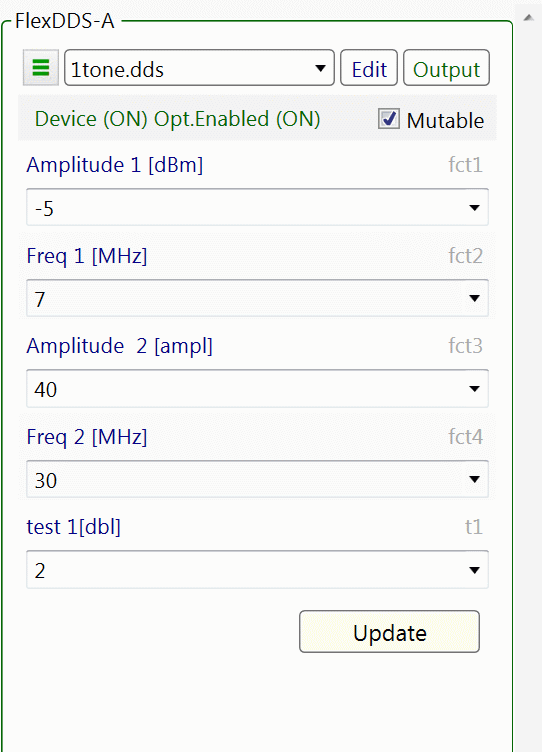
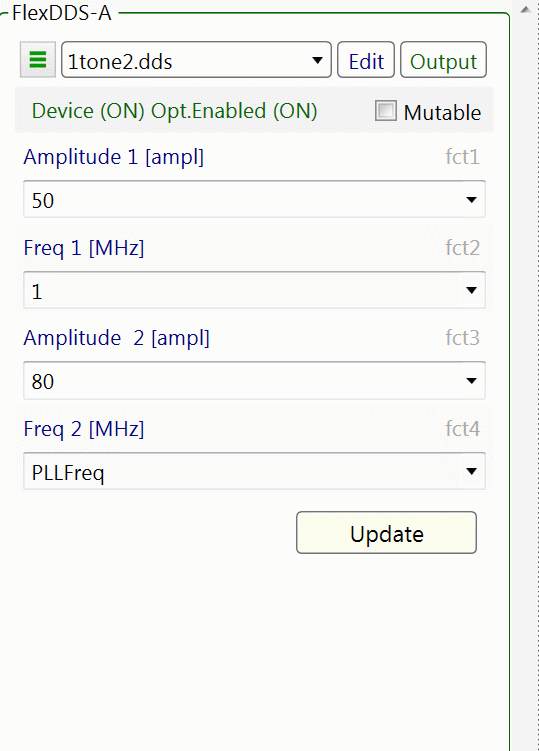
The script is generated on the base of script template which resemble the actual script with some of the fields replaced by factors (variables). Each factor can be set in different ways but most importantly the factors can be set from the front panel of FlexDDS ext.device and connected to the parameters of MM2 (see on the right).
Each device board has its own folder named FlexDDS-x (x is A,B,C...). There are all the script templates for this board and its configuration file FlexDDS.CFG.
Another file you may need to edit is FlexDDS.LMTS in common config folder. There are the limits of different types of factor identified by units. The format of individual unit limits is unit=min:max. (or unit=:max / unit=min: for upper or lower limit only). If the unit is missing (or unit=:) there would be no limits for that type of factor.
On the top/left corner three bar button will lead you to some additional commands:
- Check the device, in case the device gets disconnected in order to reconnect you need to check the connection from there.
- Test the device, you can open and send *.dcp file with pure dds script to the device.
- New template, you can create a new template from here.
FlexDDS ext.device (MOTMaster2)

FlexDDS script template
The template is accessible from Edit button and it is a plain text file. The active template can be selected from combo box showing all templates (*.dds files) in corresponding ext.device directory inj Config directory of MM2. Each template is accompanied by the initial values file with the same name as the template and extension *.ds0.
A template has two sections:
[script] section contains the template which defines the required
generated pattern.
The pattern is parameterized using factors. The factors are encoded as
$factor$. Before sending the script to FlexDDS all the factors in the
script template will be replaced by the values taken from factors
fields. The factor's names must be unique and must be present in the
[factors] section.
[factors] section
Two formats for a factor in factor section are acceptable:
open factor -> <name>=<description-incl-unit>
internal factor -> <name>=<description-incl-unit>=<expression-of-factorts>
Only open factors are set to the front to be used as ext.device UI factors.
Factors in the expression must be declared above the internal factor.
The expression syntax if defined on Parameter Expressions section.
If a factor is not present in [script] section it will be ignored.
Additional two "select" (switchable) factors are available:
- select-bnc.trigger -> for selecting the trigger mode
- select-bool.1 -> for boolean value
The select factors will be simply replaced by selected from combobox
text.
No need to list select factors in factor section, just use them in the
script section
The conversion from face value to the number (hex or decimal) in the
script depends on the units of the factor.
The available units are:
- for frequency: [Hz], [kHz] or [MHz]
- for phase: [deg]
- for amplitude: [dBm] or [ampl](in %) -> 100% corresponds to 3fff,
which is referred as full amplitude in the manual (p19)
- for ramp ampl: [dBmR]
- for time: [ms], [ns] or [us]
- universal: [int] integer decimal number; [dbl] float point decimal;
[hex:<num>] hexadecimal with <num> number of positions
Comments are annotated by # and ignored (whole line or inline) in the
script generation.
Multiline comments start with #< and end with #> at the beginning of the
line.
It is a good practice to richly comment your template.
Macro commands
Macro command are part of the template and start with @. The interpreter will replace the macro line with particular parameterized script. The usual argument type for macro command is [dbl] (double) or [int] (integer).
@Init() - similar to reset command of FlexDDS but implements complete initialization of AD9910 (according to Wolfgang)
The type of the arguments: chn and mode are [int] type and the rest of them are [dbl] (rate* is rounded to integer).
@setRamp(chn, mode ,rate, duration, range) - set a ramp "envelope" which will be used for ramping. That version sets ramp in symmetrical fashion (ramping Up and Down will be the same)
- chn - 0/1/2 (2-both)
- mode - (type of ramping) 1->Amplitude; 2->Frequency; 3->Phase[rad]; 4->Phase[deg]
- rate - in AD9910 units (see manual)
- duration - duration of the ramp in sec
- range - units depend on mode
@setRamp2(chn, mode ,rateUp, durationUp, rangeUp, rateDown, durationDown, rangeDown) - similar to ramp but allowing Up and Down to be different.
@rampFreq(chn, smooth, freqStart, durationUp,
freqMiddle, durationDown) - ramp frequency up to freqMiddle
and down to freqStart
smooth - 0-10; nSteps/s = smooth * 20e6 + 4000; duration [sec]; freq*
[MHz]
@rampAmpl(chn, smooth, apmlStart, durationUp, amplMiddle,
durationDown) - ramp amplitude [%] up to amplMiddle and down
to amplStart
smooth - 1-10; duration [sec]; ampl* [ampl]
@rampdBm(chn, smooth,
apmlStart, durationUp, amplMiddle, durationDown) - ramp amplitude [dBm]
up to amplMiddle and down to amplStart
smooth - 1-10; duration [sec]; ampl* [dBml]
@rampPhase(chn, smooth,
phaseStart, durationUp, phaseMiddle, durationDown) - ramp phase
[deg] up to phaseMiddle and down to phaseStart
smooth - 1-10; duration [sec]; phase* [deg]
dds reset
dcp 0 spi:CFR2=0x1000080
dcp 0 spi:STP0=0x418937
dcp 0 wait:0h:
dcp 0 update:u
dcp 1 spi:CFR2=0x1000080
dcp 1 spi:STP0=0x418937
dcp 1 wait:0h:
dcp 1 update:u
Example of ramp:
[script]
...
@setRamp(0,1,$t1$,0.3,10)
@setRamp2(0,1,$t1$,3,4,5,10,20)
...
[factors]
...
t1=test 1[dbl]
The script to be sent
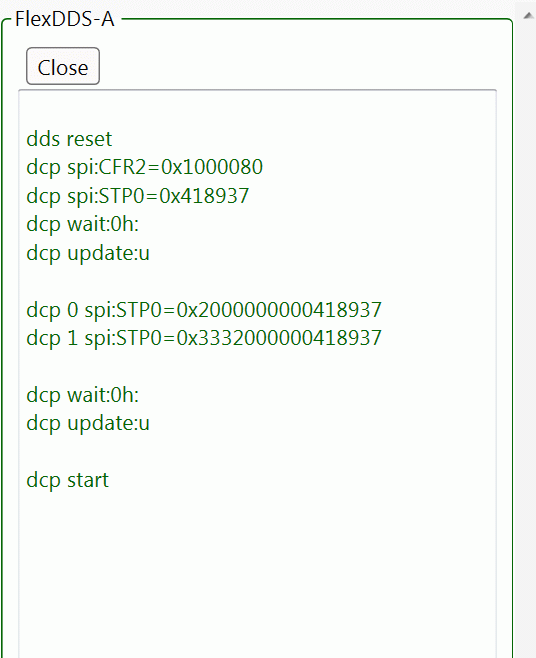
After setting all the factors you can see the actual script which about to be sent to the device (button Output front panel). Exactly the same script is sent when press Update button or start MM2 procedure.